PINGEQUA
5Ghost WiFi Devboard para Flipper Zero – BW16 RTL8720DN Doble Banda
5Ghost WiFi Devboard para Flipper Zero – BW16 RTL8720DN Doble Banda
No se pudo cargar la disponibilidad de retiro
Complete your build
5Ghost WiFi Devboard · BW16
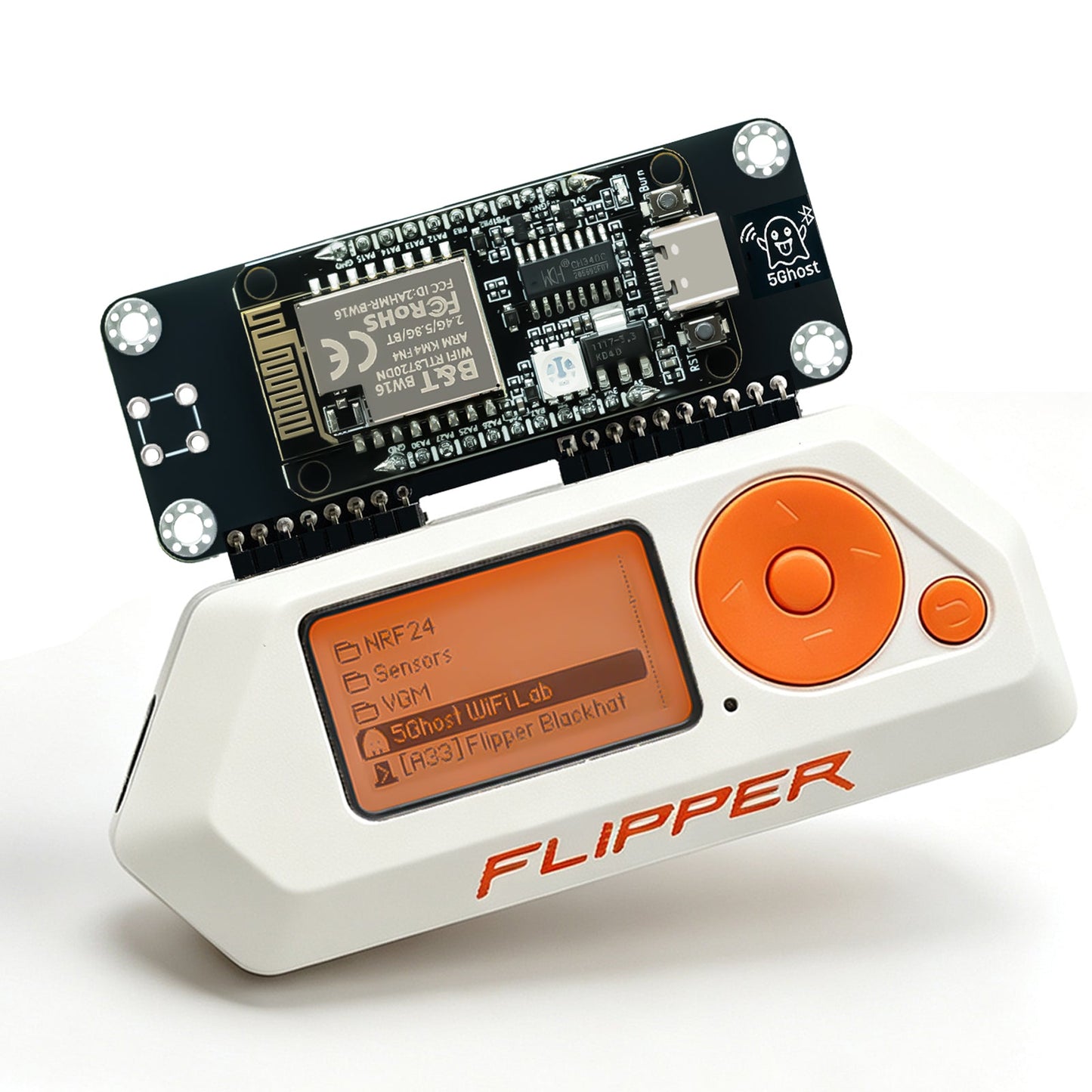
El 5Ghost WiFi Devboard es un add-on de investigación Wi-Fi de doble banda 2.4 / 5 GHz para el Flipper Zero, construido sobre el Realtek RTL8720DN (BW16) y enviado preflasheado con la app open-source 5Ghost WiFi Lab. Donde la placa ESP32-S2 es solo 2.4 GHz, 5Ghost escanea, captura y prueba en ambas bandas — y la release 2.6.0-beta añade captura PMKID sin cliente (beta), recon de estaciones Wi-Fi y beacons multi-SSID. Elige la antena onboard compacta o la antena externa dual-band 8 dBi para más alcance.
Elija 5Ghost para BW16 de 5 GHz preflasheado. Elija Scout Lite para wardriving ESP32-C5 con GPS. Elija la placa ESP32-S2 para 2,4 GHz de entrada. Host Flipper Zero no incluido.
- Escaneo dual-band real. Survey 2.4 GHz y 5 GHz con detección exacta de WPA3 / PMF (802.11w) y etiquetado mesh — no solo 2.4.
-
Captura PMKID sin cliente beta La asociación AUTHPROBE obtiene un PMKID sin cliente en la red; selector de objetivo 2.4 + 5 GHz y gate de calidad de captura, exportado como
.22000+.json. - Captura de handshake en 5 GHz. Handshakes WPA / WPA2 de 4 vías exportados como PCAP para hashcat (modo 22000) y aircrack-ng, por la ruta fiable de 5 GHz.
- Recon de estaciones Wi-Fi. En una red que posees o estás autorizado a probar, enumera los clientes asociados y limita las pruebas de deauthentication y la captura de handshake a una estación elegida.
- Beacon multi-SSID 2.6.0-beta Emite varios beacons con nombre / multi-BSSID para pruebas de alcance y captive portal.
- Recon BLE. Escaneo Bluetooth-LE multi-ronda deduplicado marca fabricantes de dispositivos, trackers Find My / AirTag, Flipper Zeros cercanos y OUIs de vendor de access points.
- Deauth consciente de PMF. 2.4 + 5 GHz — y te indica qué access points son inmunes a 802.11w / WPA3 en lugar de fallar en silencio.
- Evil Portal & Soft AP. Captura de credenciales de captive portal con páginas demo incluidas o HTML personalizado desde la SD; se abre solo en iOS.
- Mapa de canales dual-band. Congestión en 2.4 + 5 GHz con el canal más silencioso resaltado.
-
Todo a la SD. Escaneos, handshakes,
.22000,.jsony logs BLE escritos de forma atómica con confirmación en pantalla.
Auditorías más completas, resultados más fiables.
-
Captura PMKID sin cliente beta Obtén un PMKID sin esperar a que un cliente se una — asociación AUTHPROBE, selector de objetivo 2.4 + 5 GHz y gate de calidad, exportado directo a
.22000de hashcat más un registro.json. - Recon de estaciones Wi-Fi. Lista los clientes asociados en una red que posees o estás autorizado a probar, luego limita la deauthentication y la captura de handshake a una estación en lugar de todo el aire.
- Beacon multi-SSID. Emite varios beacons con nombre / multi-BSSID a la vez para pruebas de alcance y captive portal.
- Lectura WPA3 / PMF más nítida. Los escaneos ahora etiquetan con precisión redes WPA3-SAE, modo transición y PMF (802.11w), y marcan nodos mesh.
- Recon BLE que se acumula. La deduplicación multi-ronda construye una lista estable de trackers Find My / AirTag, Flipper Zeros cercanos y OUIs de vendor de AP — el firmware de Flipper no expone el escaneo Bluetooth-LE a las apps por sí solo.
-
Todo llega a la SD. CSV, PCAP,
.22000,.jsony logs BLE se escriben de forma atómica con confirmación en pantalla, así una captura está completa o claramente no.
Artículo completo: la guía Wi-Fi dual-band 2.6.0-beta. La PMKID sin cliente se envía como beta — ver Límites honestos abajo.
Una radio Wi-Fi de doble banda, controlada por tu Flipper.
El Flipper Zero no tiene radio Wi-Fi propia. Este devboard añade una radio dual-band BW16 (RTL8720DN), controlada desde el Flipper por el enlace GPIO UART con la app 5Ghost WiFi Lab. Nada corre en un portátil durante el uso — el Flipper lo controla.
│ app 5Ghost WiFi Lab (.fap)
│
▼ GPIO · UART (TX/RX) + 5V/GND
BW16 / RTL8720DN — firmware de módulo precargado
└─ 2.4 GHz + 5 GHz radio Wi-Fi dual-band
Dónde una placa dual-band se adelanta.
| Placa Wi-Fi clásica 2.4 GHz |
Placa ESP32-C5 |
5Ghost BW16 · esta placa |
|
|---|---|---|---|
| Bandas Wi-Fi | solo 2.4 GHz | 2.4 + 5 GHz (temprano) | 2.4 + 5 GHz |
| Madurez 5 GHz | — | en maduración | ruta de captura principal |
| Lectura WPA3 / PMF | básica | básica | detecta + alerta |
| PMKID sin cliente | varía | varía | sí · beta |
| Recon BLE en Flipper | varía | varía | Find My / AirTag / Flipper |
| Setup para Flipper | varía | varía | preflasheado, dock-and-go |
| Recuperación / re-flash en navegador | varía | varía | sí |
Cómo leer la tabla: los clásicos ESP32 / S2 / S3 / C3 / C6 son solo 2.4 GHz; el ESP32-C5 (Espressif, 2024) es el primer ESP32 dual-band y añade escaneo y deauth 5 GHz tempranos, aún en maduración. También existen otras placas BW16 / RTL8720DN — la ventaja de 5Ghost no es un chip exclusivo, sino dual-band fiable, conciencia WPA3 / PMF, recon BLE y setup dock-and-go preflasheado. «Varía» significa que depende de la placa y firmware concretos. Desglose más profundo: 5Ghost vs ESP32-Marauder →
Qué distingue a 5Ghost — no un chip exclusivo, sino la combinación: captura dual-band 5 GHz fiable, alertas WPA3 / PMF que nombran qué access points son inmunes, captura PMKID sin cliente (beta), recon BLE en el Flipper (detección Find My / AirTag / Flipper) y dock-and-go preflasheado con recuperación en el navegador en un clic.
Hecho para trabajo Wi-Fi práctico.
- Autoauditorías en casa y oficinas pequeñas. Ve quién está en tus redes 2.4 y 5 GHz, detecta cifrado débil y comprueba si WPA3 / PMF está realmente activado.
- Labs IoT y red team. Explora ambas bandas, luego captura handshakes y PMKID (beta) para análisis offline — en equipos que posees o tienes autorización explícita para probar.
- CTF y retos wireless. Un equipo de captura dual-band de bolsillo que corre entero desde el Flipper — sin portátil en la mesa.
- Educación y formación en seguridad. Resultados honestos y etiquetados — incluido lo que no puede hacer — lo convierten en herramienta didáctica, no en caja mágica.
Preflasheado — enchufa y listo.
- Aprieta la antena, luego acopla. Apaga el Flipper, aprieta primero la antena SMA externa, asienta la placa en el header GPIO superior sin torcer los pines, enciende.
- Instala la app. Descarga el último
5ghost_wifi_lab.fapde GitHub Releases y cópialo a/ext/apps/GPIO/en la tarjeta microSD. - Escanea. Abre Apps → GPIO → 5Ghost WiFi Lab, luego empieza con Scan Wi-Fi o Channel Map para confirmar que la placa comunica. Los datos se exportan a
/ext/apps_data/5ghost/.
Recuperación del firmware del módulo en el navegador — sin toolchain.
El módulo se envía preflasheado, así que el setup normal no necesita flashear nada. Si la placa deja de responder o llega una actualización de firmware, recupérala directamente desde el navegador — los errores de puerto COM y modo descarga que tropiezan con esptool se gestionan por ti.
- Abre el flasher. Visita flash.pingequa.com/devices/bw16-5ghost en Chrome o Edge de escritorio, o Chrome en Android (Web Serial).
- Conecta. Enchufa la placa al ordenador con un cable USB-C de datos y haz clic en
Flash. - Si falla la entrada automática. Mantén
BOOT, pulsaRESET, sueltaBOOTe inténtalo de nuevo.
Hecho para el Flipper Zero, todos los firmwares principales.
- Flipper Zero (GPIO / UART)
- Firmware Official
- Firmware Momentum
- Firmware Unleashed
- Uso autónomo — el Flipper Zero es el host
- Otras placas BW16 / RTL8720DN — la app está hecha solo para el hardware PINGEQUA 5Ghost
Un build universal .fap corre en Official, Momentum y Unleashed — evita las APIs deshabilitadas en el firmware Official, así un solo build funciona en los tres.
Los números que importan.
| Radio | |
| Chipset | BW16 (RTL8720DN) |
| Bandas Wi-Fi | 2.4 GHz + 5 GHz (dual-band) |
| Interfaz | |
| Enlace al host | Header GPIO Flipper Zero · UART (TX/RX) + 5V/GND |
| Conector | GPIO de 18 pines |
| Antena | Antena PCB onboard, o SMA dual-band externa 8 dBi |
| Software | |
| App Flipper | 5Ghost WiFi Lab (5ghost_wifi_lab.fap) v2.6.0-beta, MIT — github.com/pingequalab/5ghost-wifi-lab |
| Firmware del módulo | Preflasheado (re-flash / recuperación en navegador disponible) |
| Firmwares Flipper | Official / Momentum / Unleashed |
| Exportación de datos | CSV, PCAP, .22000, .json y logs BLE a /ext/apps_data/5ghost/
|
| En la caja | |
| Incluido | 1 × 5Ghost BW16 devboard (variante antena onboard o externa 8 dBi) |
| No incluido | Dispositivo host Flipper Zero (mostrado solo como referencia) |
| También necesitas | Un Flipper Zero (host, no incluido) y una tarjeta microSD (FAT32) para la app y las capturas |
Lo que no puede hacer, dicho con claridad.
- La PMKID sin cliente es beta. La ruta de captura está validada en la placa, pero la cobertura real en todos los access points aún madura — trátala como experimental, no como un acierto garantizado de un solo disparo. Tampoco ayuda en redes WPA3-SAE (ver abajo).
- WPA3-SAE no tiene hash crackeable offline by design — 5Ghost lo detecta y etiqueta pero no puede producir una captura crackeable. Es una limitación del protocolo, no un fallo de la herramienta. Las redes en modo transición que aún aceptan WPA2 siguen expuestas a downgrade.
- Los access points PMF / WPA3 no se pueden deautenticar. Eso es 802.11w funcionando como está diseñado; la app te alerta en lugar de fallar en silencio.
- La captura de handshake usa 5 GHz. El RTL8720DN a menudo no oye frames de uplink de cliente 2.4 GHz (M2/M4), así que 5 GHz es la ruta de captura fiable.
- El roaming mesh es difícil en hardware de una sola radio. Los nodos del mismo canal se capturan en una pasada; el roaming 802.11r entre canales es difícil.
- La apertura automática del captive portal en Android puede bloquearse con Private DNS / DoH; un disparador HTTP manual sigue funcionando.
Preguntas reales, respuestas directas.
Q.01¿Puede un Flipper Zero hacer Wi-Fi 5 GHz de verdad con esta placa?
Sí. El BW16 (RTL8720DN) es una radio dual-band, así que 5Ghost escanea, captura handshakes y ejecuta deauth en 2.4 GHz y 5 GHz. Las placas ESP32 clásicas — el ESP32 original, S2, S3, C3 y C6 — son solo 2.4 GHz; el ESP32-C5 más nuevo añade soporte 5 GHz aún en maduración. La ventaja de 5Ghost es dual-band fiable hoy, conciencia PMF / WPA3 y setup preflasheado, no un chip que nadie más tenga.
Q.02¿Qué es la captura PMKID sin cliente y por qué es beta?
La mayoría de capturas de handshake esperan a que un dispositivo se conecte para pillar el handshake de 4 vías. La PMKID sin cliente lo salta: 5Ghost se asocia activamente con el access point (AUTHPROBE) y obtiene el PMKID del primer mensaje EAPOL, sin cliente en la red. Eliges un objetivo 2.4 o 5 GHz, un gate de calidad puntúa la captura y se exporta a hashcat modo 22000 (.22000) más un registro .json.
Se envía como beta: la ruta está validada en la placa, pero la cobertura real en todos los access points aún madura, y no aplica a WPA3-SAE. Trátala como experimental.
Q.03¿Qué firmware de Flipper necesito?
Official, Momentum o Unleashed. Un build universal 5ghost_wifi_lab.fap corre en los tres — evita las APIs deshabilitadas en el firmware Official.
Q.04¿Tengo que flashear la placa primero?
No. El módulo se envía preflasheado. Solo copia 5ghost_wifi_lab.fap a /ext/apps/GPIO/ y ábrelo. El flashing en el navegador en flash.pingequa.com/devices/bw16-5ghost es solo para recuperación o actualizaciones.
Q.05¿Por qué no funcionan las pruebas de deauthentication o el cracking de handshake en mi propia red WPA3?
Las redes WPA3 / PMF (802.11w) ignoran la deauth por management frames by design, y WPA3-SAE no tiene hash crackeable offline. La app marca estos objetivos protegidos en lugar de fallar en silencio. Las redes en modo transición que aún aceptan WPA2 siguen siendo comprobables.
Q.06¿Antena onboard o la externa 8 dBi?
La antena PCB onboard mantiene el footprint compacto del Flipper. La antena SMA dual-band externa 8 dBi cambia tamaño por alcance — elígela si quieres más alcance en ambas bandas.
Q.07¿Funciona sin un Flipper Zero?
No. Es un módulo companion — el Flipper Zero es el host y no está incluido en este listing.
Shipping & Delivery
Shipping & Delivery
We dispatch in 1–3 business days from Dongguan / Shenzhen. Free tracked shipping from $29.99 USD ($34.99 in the EU). Typical transit after dispatch: 7–10 business days to the US, Canada, the UK, and the EU. Duties and taxes are included for the US, Canada, the UK, and the EU. Host device is not included.
Warranty & Returns
Warranty & Returns
14-day returns for unused items in original packaging. 6-month limited warranty against manufacturing defects. Change-of-mind return shipping is paid by the customer. We cover return shipping for defective, damaged, or wrong items. Damage from wiring mistakes or incorrect flashing is not covered.
Unfortunately, my experience with this board has been very disappointing.
Wi-Fi scanning works, but the Handshake function does not capture any EAPOL packets at all. I tested it on my own 5 GHz WPA2 networks with multiple clients, including an iPhone and a Windows laptop. The clients disconnect and reconnect correctly, but 5Ghost always stays at EAPOL: 0.
Guided Audit also reports Unsupported PMKID.
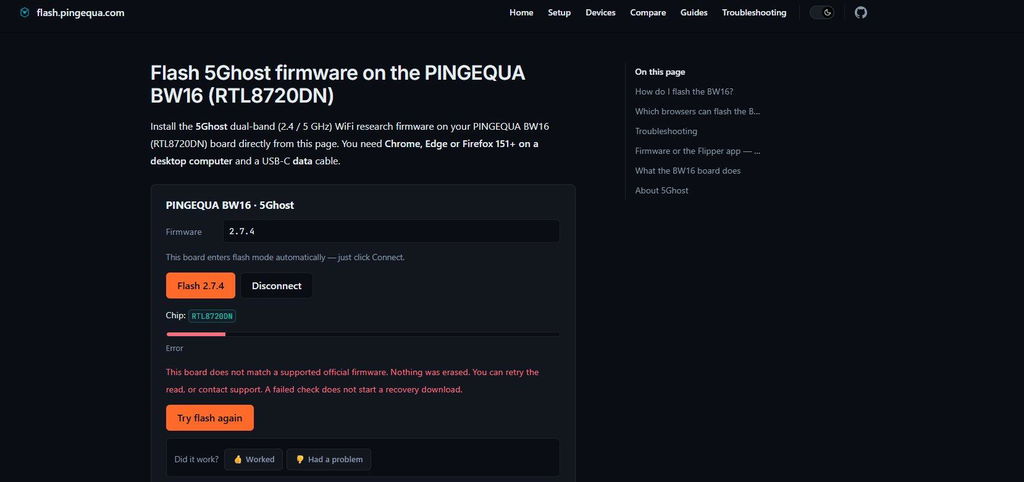
The biggest problem is that the official PINGEQUA flasher detects the board as RTL8720DN, but then refuses to flash it with the message:
“This board does not match a supported official firmware.”
This is especially strange because the 5Ghost app itself reports the installed firmware as OFFICIAL.
Current versions:
- Board firmware: 2.7.3
- Flipper app: 2.7.8
For a board sold specifically for 5Ghost, this is not acceptable. Basic scanning works, but important advertised features do not work reliably on my unit, and even the official firmware updater rejects it.
At this point I cannot recommend it unless the firmware/support situation is fixed.
Icl this board is beautifull 🤩🥹 excuse my awful camera quality

Very good board


Excellent bit of kit works really well just need to download the fap file drop it in the gpio on your sd card for your flipper and away you go

Amazing module, works perfectly with unleashed firmware, but rogue master isn't supported. Already tested it and it does work with both 5 and 2.4g with a pretty good range

Great packaging very fast delivery very clean and neat looking board.
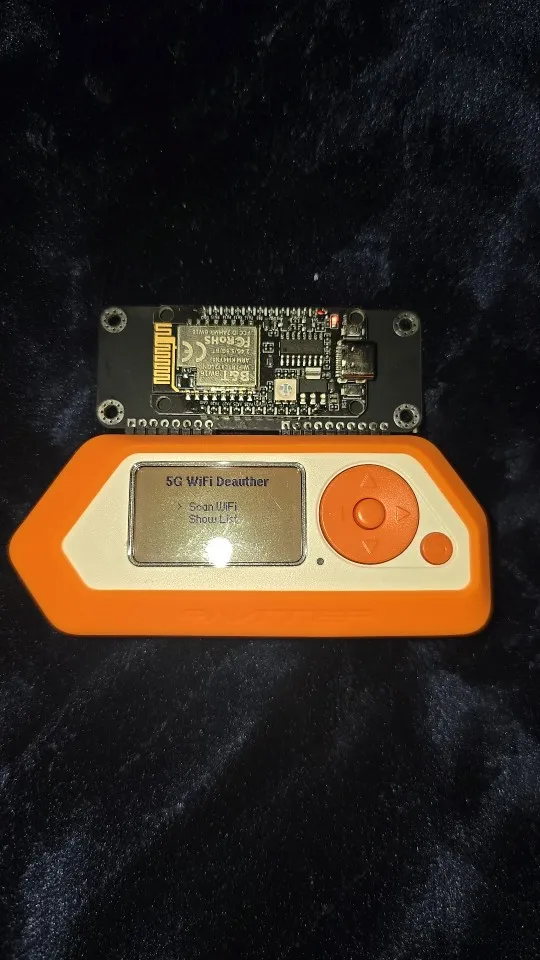

It works perfectly, does exactly as it should, i'm more than happy with this purchase, highly recommend


Cant do so much things as other devices and a bad firmware
The board is better than I ever thought.
Produit fonctionnel et de qualité. je recommande. L'application 5Ghost Lab à l'air d'etre coder par IA ainsi que le site internet, mais cela n'empeche pas que cela focntionne. Livraison 2 semaines.
It was awesome it had everything I needed and more
Customer service is very fast. It's pretty straightforward even for beginners like me. This is an awesome device.. works well in my own network 5G.. t
i cant seem to figue out to use the hundreds of html files i have in my evil protal with this board please someone let me know
Quality product and fast shipping
BW16 Devboard for Flipper Zero with Antenna
BW16 Devboard for Flipper Zero with Antenna
Fast fast delivery
BW16 Devboard for Flipper Zero with Antenna
DOES EVERYTHING AS EXPECTED
BW16 Devboard for Flipper Zero with Antenna
BW16 Devboard for Flipper Zero with Antenna
BW16 Devboard for Flipper Zero with Antenna
BW16 Devboard for Flipper Zero with Antenna
Good board. Delfyrtl fap application is not really the great as there is no sniffing or any of the more advanced attacks such as in marauder firmwares, but it generally works and i can't complain much.
BW16 Devboard for Flipper Zero with Antenna
BW16 Devboard for Flipper Zero with Antenna
BW16 Devboard for Flipper Zero with Antenna
It arrived smoothly and I am satisfied! Thank you very much.
BW16 Devboard for Flipper Zero with Antenna
BW16 Devboard for Flipper Zero with Antenna
BW16 Devboard for Flipper Zero with Antenna