PINGEQUA
Scout Lite for Flipper Zero — ESP32-C5 Wi-Fi 6 Wardriver with L86 GPS
Scout Lite for Flipper Zero — ESP32-C5 Wi-Fi 6 Wardriver with L86 GPS
Couldn't load pickup availability
Complete your build
Scout Lite
Hardware, firmware, and two Flipper apps.
The board is dual-band Wi-Fi and GPS. The firmware is custom Marauder for Scout Lite, already installed. SigRoam is a Flipper app you install for the survey screen. The Marauder app is the other Flipper app. Switching apps does not reflash the board.
- Hardware · Wi-Fi and GPS
- Firmware · custom Marauder
- Marauder app · scan and menu
- SigRoam app · survey screen
On the board.
In the box
- Scout Lite, firmware installed
- Dual-band SMA antenna
You also need
- Flipper Zero
- FAT32 microSD card for the logs
Custom Marauder for Scout Lite.
Already on the board. Both apps use this firmware. Neither app is written onto the ESP32.
- It scans 2.4 GHz and 5 GHz, wardrives with GPS, and writes the log on the board’s card.
- Wardrive transmits while it hops channels.
- WiGLE sends only when you press Upload. Stopping a survey leaves the count and the last result.
- The WiGLE key is two files on the Scout Lite card:
wigle_api_name.txtandwigle_api_token.txt. The board reads them at boot and deletes them. - Wi-Fi is not read from the card. Join the network in the SigRoam app. The board saves that connection.
To update this firmware: Update the board.
Two apps. One firmware.
Install SigRoam on the Flipper, not on the board. Choose the file for your Flipper firmware. Screens and WiGLE steps are in the app guide.
Scan, wardrive, and the menu
What this screenless board does through the Marauder app.
- 2.4 GHz and 5 GHz scanning
- Wardrive with GPS
- Logs on the board’s card, and WiGLE upload
- The general menu for this board
Survey screen
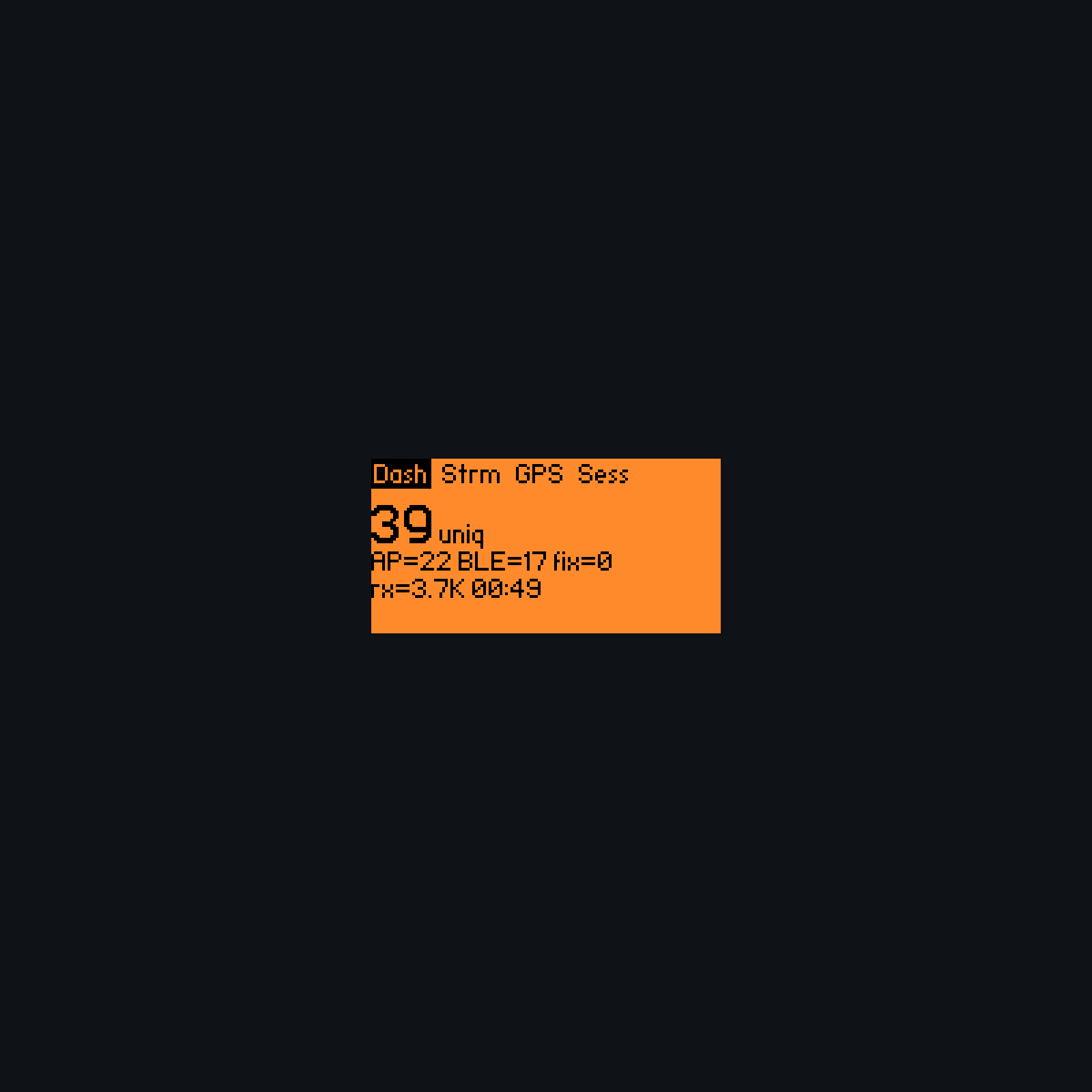
Live counts, GPS, the WiGLE queue, and Board tools.
- 2.4 GHz and 5 GHz while you survey
- GPS
- How many logs are waiting to upload
The survey screen.
These shots are the SigRoam app. The Marauder app is the other path: scan, wardrive, card logs, WiGLE, and the menu.

Both bands, plus GPS
Unique networks, AP, BLE, 2.4 GHz and 5 GHz, and whether you have a fix.

WiGLE upload
How many logs are left, the last result, and the file name while it sends. You press Upload.

The card, from the Flipper
Skip a name in the SD log, delete files, or split a long survey. After the board reboots, the split size returns to 1024 KB.

This board, named
Probe reads the custom Marauder and shows PINGEQUA Scout Lite, GPS, and the card.
Board first. Then a Flipper app.
- Antenna on. Seat Scout Lite on the Flipper. Do not power the board from pin 9 (3.3 V).
- FAT32 card in Scout Lite, not in the Flipper.
- Install the SigRoam app on the Flipper for the survey screen, or use the Marauder app for scan, wardrive, and the menu. In SigRoam, set Log Device to Off.
- Outdoors, wait for a fix, then start. Press Upload when you want the logs on WiGLE.
Before you go out.
- Wardrive on custom Marauder for Scout Lite transmits while it hops channels.
- A GPS fix needs open sky. Indoors, a survey may not start. The app can check the board, try once more, then offer a reboot.
- 5 GHz here is scanning and enumeration, not handshake capture.
- The ignore list does not hide a network from the air. It only skips that name in the SD log.
- A split size lasts until the board reboots, then it returns to 1024 KB.
Short answers.
How do I install the SigRoam app?
It is a Flipper app. Choose the file for your Flipper firmware and install it on the Flipper, not on the board. The app guide shows the screens.
When do logs go to WiGLE?
When you press Upload. The count and the last result stay. Custom Marauder for Scout Lite sends the log over Wi-Fi saved in the app.
Do I flash an app onto the ESP32?
No. Custom Marauder for Scout Lite is already on the board. The Marauder app and the SigRoam app both go on the Flipper. Switching apps does not reflash the board.
Shipping & Delivery
Shipping & Delivery
We dispatch in 1–3 business days from Dongguan / Shenzhen. Free tracked shipping from $29.99 USD ($34.99 in the EU). Typical transit after dispatch: 7–10 business days to the US, Canada, the UK, and the EU. Duties and taxes are included for the US, Canada, the UK, and the EU. Host device is not included.
Warranty & Returns
Warranty & Returns
14-day returns for unused items in original packaging. 6-month limited warranty against manufacturing defects. Change-of-mind return shipping is paid by the customer. We cover return shipping for defective, damaged, or wrong items. Damage from wiring mistakes or incorrect flashing is not covered.