PINGEQUA
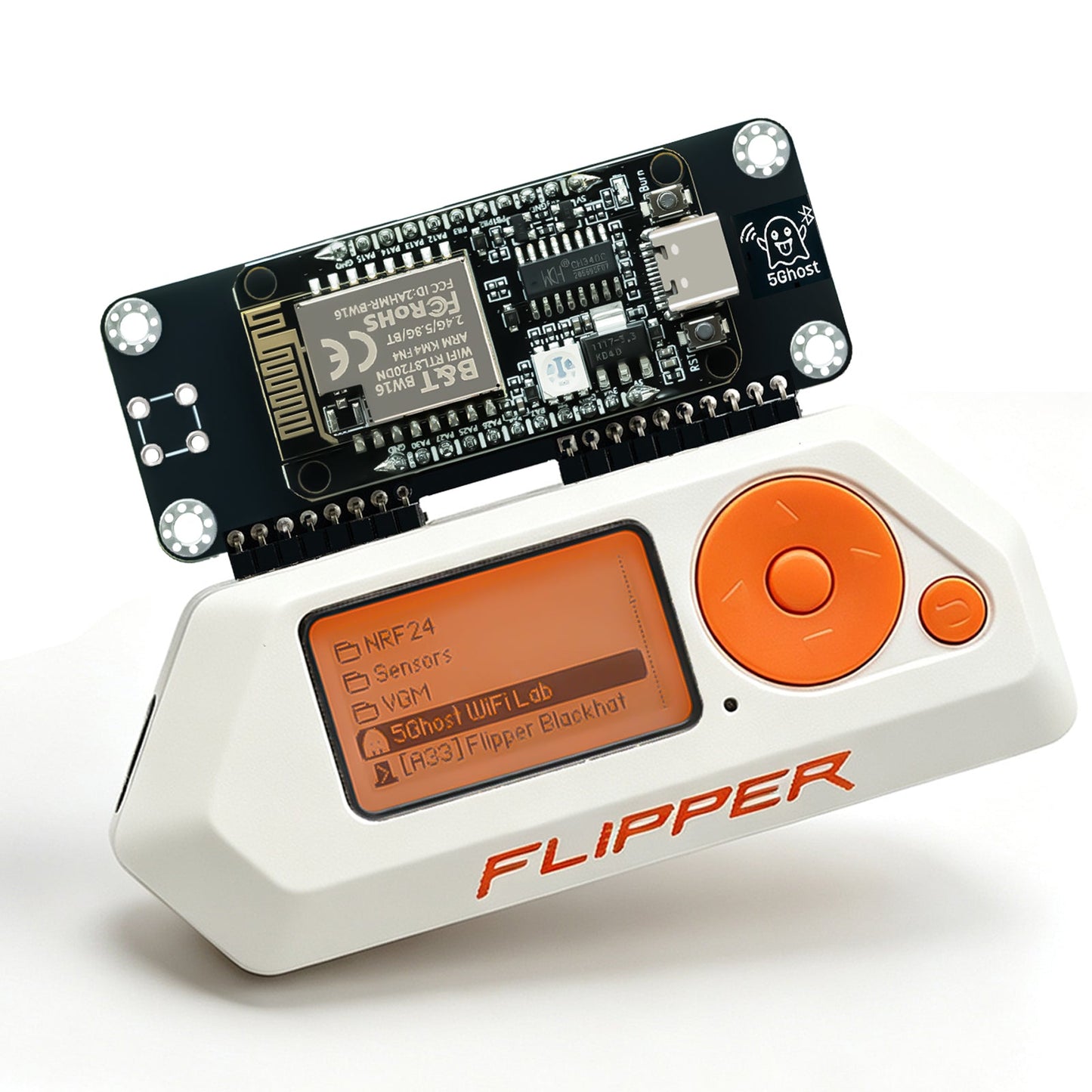
5Ghost WiFi Devboard for Flipper Zero – BW16 RTL8720DN Dual-Band
5Ghost WiFi Devboard for Flipper Zero – BW16 RTL8720DN Dual-Band
Couldn't load pickup availability
Complete your build
5Ghost WiFi Devboard · BW16
.fap.5Ghost WiFi Lab is a dual-band 2.4 / 5 GHz Wi-Fi research tool for the Flipper Zero, built on the Realtek RTL8720DN (BW16) radio. It is a native Flipper app plus a preloaded companion board: scan both bands, run a Guided Audit (the app picks handshake or clientless PMKID), or drive those captures yourself, with PMF / WPA3 detection and BLE reconnaissance — for authorized security testing and education.
-
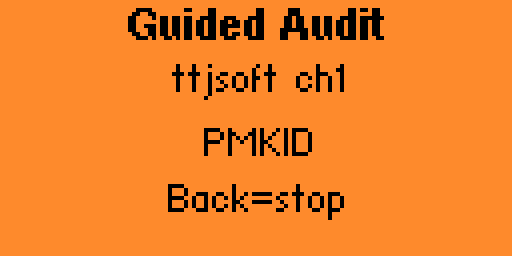
Guided Audit. Under Channel Map: pick an AP; the app chooses handshake or clientless PMKID. Complete only if a quality-gated PCAP or
.22000lands. - Dual-band scan + Channel Map. 2.4 and 5 GHz with WPA3 / PMF flags, mesh tags, and the quietest channel marked.
- Manual captures. Handshake on the 5 GHz path; clientless PMKID (beta) when no client is present.
- BLE recon. Four tracker ecosystems + nearby Flippers, then GATT, iBeacon, and BadBLE HID. Official firmware does not expose a general BLE scanner to third-party apps.
- PMF-aware deauth. Tells you which APs ignore management frames instead of failing silently. Multi-AP across SSIDs.
-
One
.fap, three firmwares. Official · Momentum · Unleashed. Firmware 2.7.3 is enough; copy app 2.7.4.
Guided Audit is the task entry. Handshake and PMKID stay for experts.
- Dual-band ScanLists 2.4 and 5 GHz APs with signal, encryption, precise PMF (capable / required), WPA3 detection, and same-SSID mesh markers.
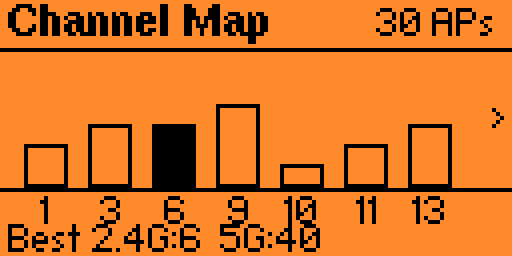
- Channel MapCongestion across both bands; footer shows Best 2.4G (1 / 6 / 11) and the least-busy 5 GHz channel actually seen. DFS can appear — receive-only.
-
Guided AuditMain menu, under Channel Map. Pick an AP; the app chooses handshake or clientless PMKID from PMF and whether stations are present. Results: Complete / Partial / Unsupported / Timeout / Blocked. Complete requires a quality-gated PCAP or
.22000plusaudit_*.json. - Capture HandshakeWPA / WPA2 4-way over the 5 GHz path, written as PCAP for hashcat (mode 22000) / aircrack-ng. Manual path when you want to pick the capture yourself.
-
Capture PMKIDBeta. Clientless AUTHPROBE association — no client needed. Quality gate; only Valid PMKID writes
.22000. - Station reconList clients on an AP you own or are authorized to test; scope deauth and handshake to one station.
- BLE ScanPassive sweep: vendors, Apple AirTag / Tile / Samsung SmartTag / Google Find My, nearby Flipper Zeros, CSV export. Not a dedicated tracker product.
- GATT · iBeacon · BadBLEConnect for GATT services; broadcast a spec iBeacon; type a BLE HID payload after the host pairs.
- Evil Portal · Create APCaptive portal (built-in, bundled, or your HTML from SD). Create AP is joinable; Send Beacon is names only.
- PMF-aware Deauth2.4 + 5 GHz. Flags 802.11w / WPA3-immune targets. Tick any mix of APs across SSIDs. DFS stays RX-only.
-
Evidence to SDCSV, PCAP,
.22000,.json,audit_*.json, BLE logs under/ext/apps_data/5ghost/with on-screen save confirmation.
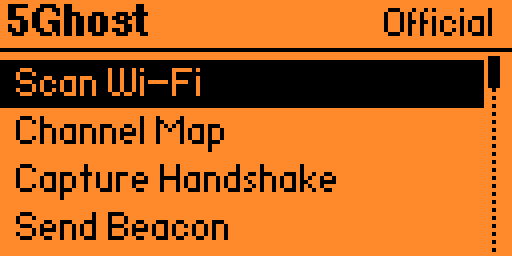
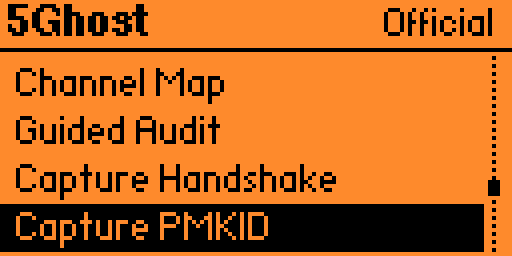
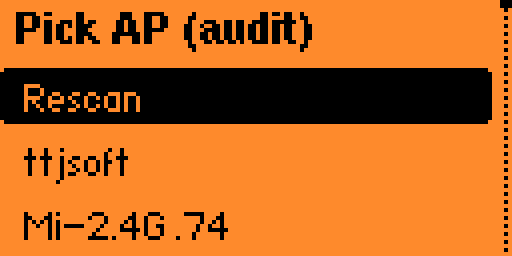
A dual-band radio, driven by your Flipper.
The Flipper Zero has no Wi-Fi radio of its own. This board adds a BW16 (RTL8720DN) dual-band radio, driven from the Flipper over GPIO UART by the 5Ghost WiFi Lab app. Nothing runs on a laptop during use.
│ 5Ghost WiFi Lab .fap · app 2.7.4
│
▼ GPIO · UART (TX/RX) + 5V/GND
RTL8720DN (BW16) — preloaded firmware 2.7.3
├─ 2.4 GHz radio · 802.11 b/g/n
└─ 5 GHz radio · 802.11 a/n · handshake path · DFS RX-only
Choose the compact onboard PCB antenna ($39.99) or the 8 dBi external dual-band SMA ($44.99) for reach. Same board, same app, same firmware.
Pick by job. 5 GHz scan is not the same as a field audit.
| Bare Flipper | Official / PINGEQUA ESP32-S2 | Apex 5 (C5) | Scout Lite (C5+GPS) | 5Ghost BW16 · this board | |
|---|---|---|---|---|---|
| Bands | No Wi-Fi | 2.4 GHz | 2.4 + 5 GHz Wi-Fi 6 | 2.4 + 5 GHz Wi-Fi 6 | 2.4 + 5 GHz native |
| Preloaded for Flipper | — | PINGEQUA S2: yes | Marauder on C5 | Marauder + GPS | Yes · dock and go |
| Native Flipper app | — | Marauder companion | Marauder companion | Marauder companion | 5Ghost WiFi Lab |
| Guided Audit | No | No | No | No | Yes · app 2.7.4 |
| PMF / WPA3 flags | — | Varies | Varies | Varies | Detects + alerts |
| BLE four-ecosystem trackers | No general BLE scanner for apps | Varies (Marauder BLE) | Varies | Varies | AirTag / Tile / SmartTag / Find My + nearby Flipper |
| GPS / WiGLE | No | No | Onboard GPS · WarDrive on V2 only | Yes · L86-M33 | No — use Scout Lite |
| Price (2026-09-01) | Host only | Official $35 (sold out on flipper.net) · PINGEQUA $29.99 | $79 on Tindie | $64.98 | $39.99 onboard · $44.99 external |
Sources dated 2026-09-01: PINGEQUA S2 $29.99 · Scout Lite $64.98 · flipper.net WiFi Devboard $35 sold out · Apex 5 Tindie $79. Deeper write-up: 5Ghost vs Marauder vs C5.
Pre-flashed — dock it and copy one file.
- Tighten the antenna, then dock. Power off the Flipper. On the external variant, thread the SMA first. Seat the board on the top GPIO header without tilting the pins, then power on.
- Install the app. Download
5ghost_wifi_lab.fap2.7.4 from GitHub Releases and copy it to/ext/apps/GPIO/on the microSD card. - Scan, then audit. Open Apps → GPIO → 5Ghost WiFi Lab. Start with Scan Wi-Fi or Channel Map. For a capture, open Guided Audit (under Channel Map), pick an AP, wait. Files land in
/ext/apps_data/5ghost/.
Module firmware recovery in the browser — no toolchain.
If the board stops responding, or you are still on firmware 2.7.1, recover it from flash.pingequa.com/devices/bw16-5ghost in Chrome or Edge on desktop (Web Serial). Hold BOOT, tap RESET, release BOOT if auto-entry fails. FAP 2.7.4 does not require a reflash when the board is already on 2.7.3.
Built for the PINGEQUA 5Ghost board.
- Flipper Zero GPIO / UART
- Official firmware
- Momentum firmware
- Unleashed firmware
- Standalone use — Flipper is the host
- Other BW16 / RTL8720DN boards — not supported
- GPS wardriving — that is Scout Lite
The numbers that matter.
| Radio | |
| Chipset | BW16 (RTL8720DN) |
| Wi-Fi bands | 2.4 GHz + 5 GHz (dual-band). DFS channels receive-only |
| Bluetooth | BLE 5.0 — scan, GATT, iBeacon, HID |
| Antenna | Onboard PCB, or 8 dBi external dual-band SMA |
| Interface | |
| Host link | Flipper Zero GPIO header · UART (TX/RX) + 5V/GND |
| Connector | 18-pin GPIO |
| Software | |
| Flipper app | 5Ghost WiFi Lab (5ghost_wifi_lab.fap) 2.7.4, MIT — github.com/pingequalab/5ghost-wifi-lab |
| Module firmware | Pre-flashed 2.7.3 (browser re-flash available; picker 2.7.3) |
| Flipper firmwares | Official / Momentum / Unleashed · one universal .fap |
| Data export | CSV, PCAP, .22000, .json, audit_*.json, BLE logs → /ext/apps_data/5ghost/
|
| In the box | |
| Included | 1 × 5Ghost BW16 (onboard-antenna or 8 dBi external variant) |
| Not included | Flipper Zero host (shown for reference) |
What it cannot do, stated clearly.
- It does not crack WPA3-SAE. SAE has no offline-crackable hash. 5Ghost labels WPA3 / PMF instead of pretending otherwise.
- PMF required ignores deauth. That is 802.11w working as designed, on any tool. The app tells you.
- Clientless PMKID is beta. Not every AP includes a usable PMKID. Complete on Guided Audit is not a promise that an empty AP will yield a hash.
- Handshake capture uses 5 GHz. This chip often cannot hear 2.4 GHz client uplink (M2/M4).
- DFS is receive-only. EU scan includes DFS + channel 165; transmit tools will not use those channels (Unsupported on Guided Audit).
- No GPS. For WiGLE wardrive, use Scout Lite. BLE tracker flags are a recon feature, not a dedicated anti-stalking product.
- Third-party BW16 is not supported. Different firmware, pinout, and antenna.
Real questions, straight answers.
Q.01Can a Flipper Zero do 5 GHz Wi-Fi with this board?
Yes. The Flipper has no Wi-Fi radio of its own. 5Ghost adds a dual-band RTL8720DN (BW16) so you can scan, map, capture, and deauth on 2.4 GHz and 5 GHz. Classic ESP32 / S2 / S3 / C3 / C6 boards are 2.4 GHz only. ESP32-C5 boards can also see 5 GHz; 5Ghost's difference is native dual-band capture plus Guided Audit on a preloaded Flipper app, not chip exclusivity.
Q.02Do I have to flash the board first?
No. The module ships preloaded. Dock it on the Flipper GPIO header and copy one .fap to /ext/apps/GPIO/. Browser flashing at flash.pingequa.com/devices/bw16-5ghost is for recovery or a firmware update. Firmware 2.7.3 is enough for Guided Audit.
Q.03How do I use Guided Audit?
Open Apps → GPIO → 5Ghost WiFi Lab → Guided Audit (under Channel Map). Pick an AP and wait. The app chooses handshake or clientless PMKID from PMF and whether stations are present. Complete only if a quality-gated PCAP or .22000 file was written. Handshake and PMKID stay on the menu for manual use. Needs app 2.7.4; firmware 2.7.3 is enough.
Q.04Can it crack WPA3?
No. WPA3-SAE is designed so a captured handshake has no crackable offline hash. 5Ghost detects WPA3 / PMF and tells you the target is out of reach. For WPA/WPA2 it captures a handshake PCAP or a clientless PMKID (beta) for offline tools such as hashcat.
Q.05Is clientless PMKID still beta?
Yes. Capture PMKID and the PMKID branch of Guided Audit are beta. The capture-to-hash path is verified; live-AP coverage still varies. Not every WPA2 AP includes a usable PMKID. Pure WPA3-SAE has no offline-crackable hash.
Q.06Does it work on third-party BW16 / RTL8720DN boards?
No. The app is built for the PINGEQUA 5Ghost board (firmware, pinout, antenna). Other BW16 boards are not supported and may not work.
Q.07What's the difference between app 2.7.4 and firmware 2.7.3?
The Flipper app 2.7.4 adds Guided Audit. Board firmware stays 2.7.3 (EU passive scan including DFS + channel 165; DFS is receive-only). Copy the new .fap from GitHub Releases; you do not need to reflash the board for this app.
Q.08Onboard antenna or the 8 dBi external one?
Same board, same firmware, same app. The onboard PCB antenna keeps the compact Flipper footprint ($39.99). The 8 dBi dual-band SMA antenna trades size for range ($44.99).
Q.09Which Flipper firmware do I need?
Official, Momentum, or Unleashed. One universal 5ghost_wifi_lab.fap build runs on all three.
Q.10Does it work without a Flipper Zero?
No. It is a companion module. The Flipper Zero is the host and is not included.
Shipping & Delivery
Shipping & Delivery
We dispatch in 1–3 business days from Dongguan / Shenzhen. Free tracked shipping from $29.99 USD ($34.99 in the EU). Typical transit after dispatch: 7–10 business days to the US, Canada, the UK, and the EU. Duties and taxes are included for the US, Canada, the UK, and the EU. Host device is not included.
Warranty & Returns
Warranty & Returns
14-day returns for unused items in original packaging. 6-month limited warranty against manufacturing defects. Change-of-mind return shipping is paid by the customer. We cover return shipping for defective, damaged, or wrong items. Damage from wiring mistakes or incorrect flashing is not covered.
Unfortunately, my experience with this board has been very disappointing.
Wi-Fi scanning works, but the Handshake function does not capture any EAPOL packets at all. I tested it on my own 5 GHz WPA2 networks with multiple clients, including an iPhone and a Windows laptop. The clients disconnect and reconnect correctly, but 5Ghost always stays at EAPOL: 0.
Guided Audit also reports Unsupported PMKID.
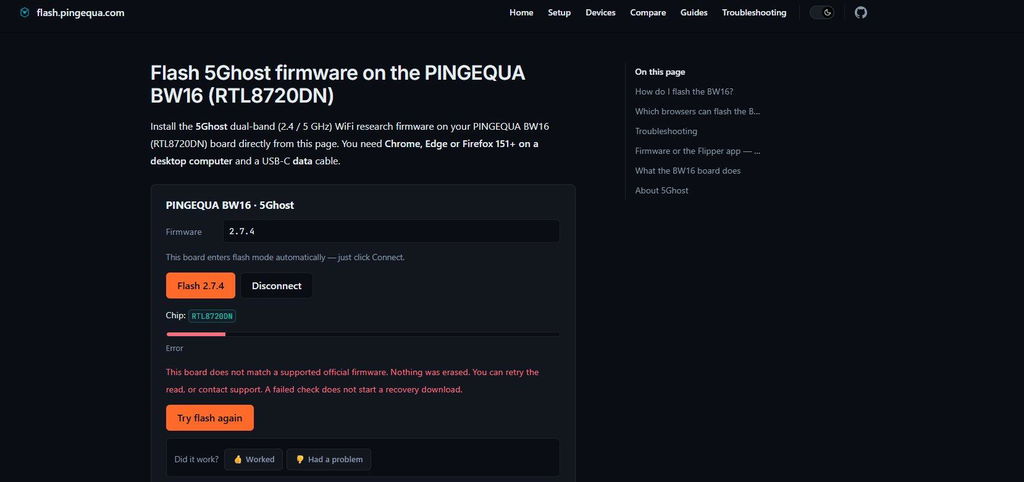
The biggest problem is that the official PINGEQUA flasher detects the board as RTL8720DN, but then refuses to flash it with the message:
“This board does not match a supported official firmware.”
This is especially strange because the 5Ghost app itself reports the installed firmware as OFFICIAL.
Current versions:
- Board firmware: 2.7.3
- Flipper app: 2.7.8
For a board sold specifically for 5Ghost, this is not acceptable. Basic scanning works, but important advertised features do not work reliably on my unit, and even the official firmware updater rejects it.
At this point I cannot recommend it unless the firmware/support situation is fixed.
Icl this board is beautifull 🤩🥹 excuse my awful camera quality

Very good board


Excellent bit of kit works really well just need to download the fap file drop it in the gpio on your sd card for your flipper and away you go

Amazing module, works perfectly with unleashed firmware, but rogue master isn't supported. Already tested it and it does work with both 5 and 2.4g with a pretty good range

Great packaging very fast delivery very clean and neat looking board.
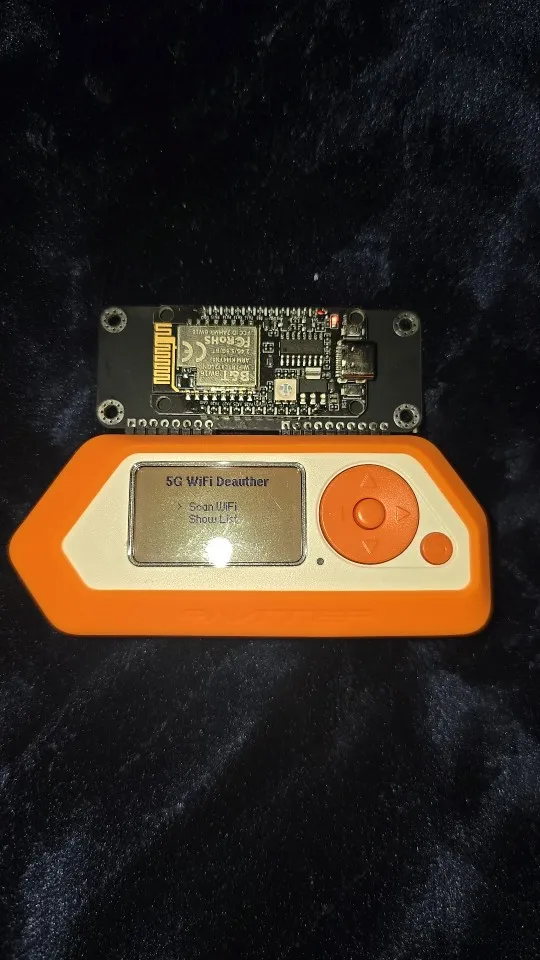

It works perfectly, does exactly as it should, i'm more than happy with this purchase, highly recommend


Cant do so much things as other devices and a bad firmware
The board is better than I ever thought.
Produit fonctionnel et de qualité. je recommande. L'application 5Ghost Lab à l'air d'etre coder par IA ainsi que le site internet, mais cela n'empeche pas que cela focntionne. Livraison 2 semaines.
It was awesome it had everything I needed and more
Customer service is very fast. It's pretty straightforward even for beginners like me. This is an awesome device.. works well in my own network 5G.. t
i cant seem to figue out to use the hundreds of html files i have in my evil protal with this board please someone let me know
Quality product and fast shipping
BW16 Devboard for Flipper Zero with Antenna
BW16 Devboard for Flipper Zero with Antenna
Fast fast delivery
BW16 Devboard for Flipper Zero with Antenna
DOES EVERYTHING AS EXPECTED
BW16 Devboard for Flipper Zero with Antenna
BW16 Devboard for Flipper Zero with Antenna
BW16 Devboard for Flipper Zero with Antenna
BW16 Devboard for Flipper Zero with Antenna
Good board. Delfyrtl fap application is not really the great as there is no sniffing or any of the more advanced attacks such as in marauder firmwares, but it generally works and i can't complain much.
BW16 Devboard for Flipper Zero with Antenna
BW16 Devboard for Flipper Zero with Antenna
BW16 Devboard for Flipper Zero with Antenna
It arrived smoothly and I am satisfied! Thank you very much.
BW16 Devboard for Flipper Zero with Antenna
BW16 Devboard for Flipper Zero with Antenna
BW16 Devboard for Flipper Zero with Antenna