
Wardriving Explained Simply: What Flipper Zero Actually Does — and What It Needs
Choosing software? See our wardriving firmware comparison: SigRoam vs ESP32 Marauder, GhostESP and Bruce.
Can a Flipper Zero wardrive? Yes — but not by itself. The Flipper is the portable control head; an external Wi-Fi scanner, GPS receiver and storage do the survey work.
Flipper Zero's official “Wardriving, explained simply” Short gives the plain-language idea: move through an area, detect nearby Wi-Fi networks and associate what you observe with location data. The hardware boundary is the part that is easy to miss.
What wardriving is
Wi-Fi access points regularly broadcast management information so nearby devices can discover them. A survey tool can record fields such as SSID, BSSID, channel, signal level, security type, timestamp and GPS coordinates.
Discovery is not the same as connection. A wardriving workflow maps access-point metadata and where it was observed; it does not require joining a network. That technical distinction does not remove legal or privacy obligations. Use these tools only for education, authorized research and lawful wireless surveying, and follow the rules that apply where you are operating.
What Flipper Zero actually does
Think of the Flipper Zero as the screen, buttons and control interface rather than the Wi-Fi radio. Flipper's own hardware specification lists Bluetooth LE, IEEE 802.15.4, Sub-GHz, NFC, RFID, infrared and GPIO, but not an IEEE 802.11 Wi-Fi transceiver.
| Job | Component | What it contributes |
|---|---|---|
| User interface | Flipper Zero | Portable display, buttons and GPIO host |
| Wi-Fi survey | External Wi-Fi scanner | Discovers access points on supported channels |
| Position | GNSS/GPS receiver | Supplies coordinates and timing |
| Survey log | microSD storage | Stores the scanner's location-aware CSV |
| Scanner firmware | ESP32 Marauder | Runs the survey and writes the data |
| Flipper interface | SigRoam or another controller | Starts, stops and monitors the external scanner |
This split matters because changing the external board changes what the setup can observe. The Flipper remains the same host; the scanner defines the Wi-Fi bands, the GPS path and where the log is stored.
Why 5 GHz matters
Many classic ESP32 Flipper Wi-Fi boards survey only 2.4 GHz. A 2.4 GHz-only scanner cannot enumerate an access point that operates only on 5 GHz, so a dual-band scanner can give a more complete view of a mixed-band environment.
Espressif specifies the ESP32-C5 as a 2.4 GHz and 5 GHz dual-band Wi-Fi 6 device with IEEE 802.11a/b/g/n/ac/ax support. It has one Wi-Fi radio, not two: Espressif's current documentation says the C5 does not operate both bands simultaneously. In automatic band mode it can scan both bands, switching its single radio as required.
GPS and storage turn discovery into a mapped survey
A Wi-Fi scan tells you that an access point was observed. GNSS tells you where it was observed. ESP32 Marauder supports an attached GPS receiver for wardriving, and its survey workflow writes location-aware data to storage for later processing or upload to services such as WiGLE.
The complete stack is therefore closer to this:
Without valid location data, a scanner can still discover networks, but the output is no longer a useful geographic wardriving log. Without storage, there is no durable survey file to process after the route.
Scout Lite puts the survey hardware on one board
PINGEQUA Scout Lite is designed around that exact split. The current product integrates an ESP32-C5-WROOM-1U, Quectel L86-M33 GNSS receiver, microSD storage, USB-C and an external dual-band antenna interface. It ships with ESP32 Marauder installed.
 Scout Lite — ESP32-C5, onboard GNSS and microSD
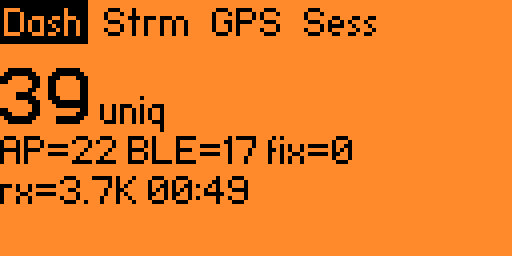 SigRoam — live AP, BLE, GPS and session status
The ESP32-C5 performs the 2.4 and 5 GHz Wi-Fi survey. The L86-M33 provides location data. The microSD card stores the survey log. The Flipper Zero remains the portable interface.
Scout Lite deliberately leaves out nRF24 and Sub-GHz radios. It is a focused Wi-Fi/GPS survey board rather than an everything-at-once RF expansion board.
SigRoam makes the Flipper the field interface
SigRoam is PINGEQUA's open-source, receive-only Flipper Zero FAP for controlling a compatible external ESP32 Marauder scanner over GPIO serial.
The current application starts and stops scans, shows AP, BLE and GPS counts, reports session and diagnostic information, estimates unique BSSIDs for progress visibility and exposes the raw serial stream. The scanner still performs the Wi-Fi survey and writes the CSV; SigRoam provides the control surface and live status.
Its scope is explicit: no deauthentication, no handshake capture and no attack traffic. Those are not future checklist items; they are outside the project's product rule.
What happens during a wardrive
- The external scanner surveys supported Wi-Fi channels and bands.
- The GNSS receiver supplies the current location.
- The scanner associates observations with coordinates and writes the survey data to microSD.
- The Flipper interface shows whether the scanner, GPS and session are behaving as expected.
- After the route, the resulting WiGLE-compatible CSV can be reviewed and uploaded.
This article explains the architecture. For the full setup sequence, use the complete Flipper Zero wardriving guide. If the hardware is already in hand, follow the first wardrive with Scout Lite tutorial. For the Flipper interface itself, read the SigRoam deep dive.
FAQ
Does Flipper Zero have built-in Wi-Fi?
Can Flipper Zero wardrive without GPS?
Does 5 GHz improve wardriving coverage?
Does SigRoam replace ESP32 Marauder?
Build the stack around the survey
Scout Lite combines the dual-band ESP32-C5 scanner, onboard L86-M33 GNSS and microSD on one Flipper Zero companion board. SigRoam adds the receive-only Flipper dashboard.
Explore Scout Lite → View SigRoam →For education, authorized research and lawful wireless surveying only. Do not connect to, access or interfere with networks you do not own or have permission to assess. Rules vary by jurisdiction; this article is general information, not legal advice.