
Flipper Zero BLE Scanner: Detect AirTags, Trackers & Nearby Flippers (2026 Guide)
A stock Flipper Zero can talk Bluetooth LE, but it was never given a mode to listen to the BLE devices around it — this guide shows the external board that fixes that.

This guide covers what BLE scanning on a Flipper actually is, why the bare device can't do it, how 5Ghost handles AirTag/tracker detection and Flipper detection, an honest comparison with phone apps and the ESP32 Marauder, and the real limits you should know before you buy.
Can a Flipper Zero scan for Bluetooth (BLE) devices on its own?
No. The Flipper Zero has a Bluetooth LE radio, but it's used for the Flipper's own app/mobile pairing — the firmware does not give third-party apps a general "scan every nearby BLE advertiser" mode. So out of the box you can't point a Flipper at a room and get a list of the Bluetooth devices in it.
That's exactly the gap an external board fills. The 5Ghost board is built on the Realtek RTL8720DN (BW16), a chip with a real BLE 5.0 radio and dual-band 2.4/5 GHz Wi-Fi. It talks to the Flipper over the GPIO UART, does the BLE scanning itself, and streams the results back to the 5Ghost app on the Flipper. The Flipper becomes the screen and controller; the BW16 does the radio work.
What does BLE scanning on 5Ghost actually show you?
Open BLE Scan in the 5Ghost app and it runs a passive Bluetooth LE sweep — it only listens, it never transmits, so it's quiet and safe to run anywhere. Each advertising device comes back as a row with:
- Signal strength (RSSI) — roughly how close the device is.
-
Name or vendor — the advertised name if the device broadcasts one; otherwise 5Ghost falls back to the vendor (e.g.
~Apple,~Samsung,~Microsoft) resolved from the manufacturer ID in the advertisement, so an unnamed gadget isn't just a meaningless MAC address. - Type tag — a normal device, a Flipper Zero, or an Apple Find My tracker.
- Full detail on tap — a per-device page with the MAC address, RSSI, device kind and vendor.
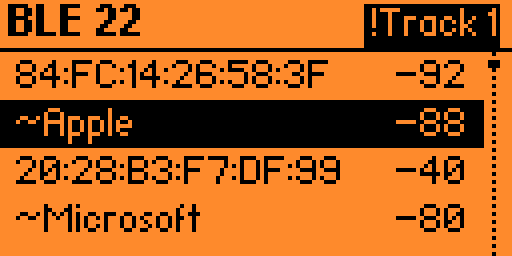
!Track chip the moment a Find My tracker is detected.ble_YYYYMMDD_HHMMSS.csv) so you can log and review them later on a computer.Can 5Ghost detect an AirTag or unknown Bluetooth tracker?
Yes — detecting Apple Find My devices is a built-in mode. AirTags and other Find My-network trackers advertise with Apple's manufacturer ID and a specific offline-finding payload; 5Ghost recognises that signature and flags those rows as trackers. When one is in range, the header stops showing a boring counter and pops an inverted alert chip instead — the moment a tracker (or a Flipper) appears, you see it.
This matters because unwanted-tracking is a real, mainstream problem. Apple and Google now ship cross-platform "unknown tracker" alerts, and there's a whole category of phone apps (Apple's Tracker Detect, AirGuard) and even dedicated hardware (BlueSleuth) built around it. 5Ghost puts a passive, offline version of that in your Flipper.
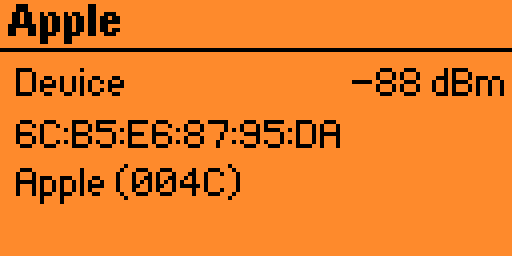
004C).Can it detect other Flipper Zeros nearby?
Yes. Flipper Zeros advertise over BLE with known MAC prefixes (0C:FA:22, 80:E1:26/27) and a default name that starts with "Flipper." 5Ghost matches those and tallies them, so you can tell how many Flippers are around you — a fun "radar" at a con, and a genuinely useful check when you're doing a security walk-through. Ironically, a bare Flipper can't do this to another Flipper; it takes the external BW16 radio.
5Ghost BLE vs a phone app vs the ESP32 Marauder
| 5Ghost (BW16) on Flipper | Phone tracker app | ESP32 Marauder board | |
|---|---|---|---|
| General BLE device list | Yes, on-device | Limited / varies | Yes (2.4 GHz radio) |
| Find My / AirTag flag | Yes | Yes (that's their whole job) | AirTag mode on some builds |
| Detect other Flippers | Yes | No | Varies |
| Vendor name from mfg ID | Yes | Sometimes | Raw data |
| Works fully offline | Yes | Usually needs the app/network | Yes |
| Also does dual-band 2.4/5 GHz Wi-Fi | Yes | No | No — 2.4 GHz only |
| CSV logging to SD | Yes | Rarely | Via app |
The takeaway: phone apps are great at the single job of "is an AirTag following me," but they don't give you a general, offline BLE list or Flipper detection. The ESP32 Marauder is a capable BLE/Wi-Fi tool, but its ESP32 chip is 2.4 GHz only — no firmware can add 5 GHz to it because the radio physically isn't there (newer dual-band mods bolt on a separate RTL8720DN — the same chip 5Ghost already uses, see Sources below). 5Ghost gives you BLE recon and genuine dual-band Wi-Fi on one board.
The dual-band bonus: one board for BLE + 2.4/5 GHz Wi-Fi
Because the BW16 is a dual-band Wi-Fi + BLE chip, the same 5Ghost board that does this BLE scanning also does 2.4 and 5 GHz Wi-Fi work — scanning, a channel-congestion map, WPA handshake capture (full M1–M4 on 5 GHz), and PMF/802.11w awareness. Most Flipper Wi-Fi add-ons stop at 2.4 GHz; 5Ghost sees the 5 GHz networks they're blind to. If you want the full picture, we wrote a dedicated piece: Can a Flipper Zero Do 5 GHz Wi-Fi? 5Ghost vs the ESP32 Marauder. For the complete tool-by-tool walkthrough — scanning, capture, PMKID, deauth, and this BLE suite — see our full 5Ghost WiFi Lab feature guide.
One architectural note for the technically curious: the BW16 has a single antenna/PA, so BLE and Wi-Fi attacks don't run simultaneously — the app switches modes rather than doing both at once. That's a deliberate hardware reality, not a bug.
The honest limits
- Passive scan. BLE scanning listens only. It won't connect to, pair with, or spoof devices — by design. 5Ghost is a detector, not a tracker-clone.
- Signature-based. Tracker tagging keys off each ecosystem's advertised signature; it now covers the big four (Apple AirTag, Tile, Samsung SmartTag, Google Find My), but a tracker that doesn't broadcast a recognizable signature can still appear only as a generic device.
- Not concurrent with Wi-Fi. Single-antenna hardware means BLE and Wi-Fi modes take turns.
- It needs the board. This is a BW16 feature; the app hides BLE Scan unless a 5Ghost module reporting BLE support is connected.
How to get BLE scanning on your Flipper Zero
You need two things: the 5Ghost BW16 dual-band board and its free, open-source companion app.
- Get the board: 5Ghost WiFi Devboard for Flipper Zero (BW16 / RTL8720DN, dual-band) — pick the onboard-antenna version or the external-antenna version for longer range.
- Install the 5Ghost app from the Flipper app catalog (or our GitHub), and flash the BW16 firmware — no PC toolchain needed via our web-serial flasher.
- Plug the board onto the GPIO, open the app, and choose BLE Scan.
Ready to see what's advertising around you?
The 5Ghost BW16 board turns your Flipper Zero into an offline BLE scanner, AirTag/Find My detector, and dual-band 2.4/5 GHz Wi-Fi tool — one board, one antenna, no PC required to flash.
Shop the 5Ghost WiFi DevboardFAQ
Does BLE scanning work without Wi-Fi or internet?
Will it tell me who owns an AirTag that's following me?
Does it detect Tile and Samsung SmartTag trackers too?
Can 5Ghost broadcast or spoof an AirTag like FindMyFlipper?
Is BLE scanning legal?
Do I need the external-antenna version?
Sources & further reading: CNX Software — "ESP32 Marauder Double Barrel 5G adds 5GHz deauthentication with RTL8720DN module" (Sept 2025).
For authorized security testing, personal safety, and education only. Scan and test only devices and networks you own or have explicit permission to assess. Wireless devices are subject to local RF regulations (e.g. FCC Part 15 in the US). 5Ghost is an independent PINGEQUA project and is not affiliated with Flipper Devices, Apple, or the ESP32 Marauder project.